I don't usually use iTunes, but I'm stuck with my lady's macbook, so here I am. Is there some sort of system for prioritizing downloads? I purchased a show via the apple TV, which I am now downloading locally to the macbook. I am about halfway in to the season, and so I have no interest in downloading the episodes I have already watched and yet I am now downloading them all simultaneously. Additionally, the store/ purchased files distinction could be clearer. For instance, I click on the particular episode I want to watch while its downloading and it shows me a clip from the store. If its a show I own, why on earth would I want to watch a seven second clip?
Yeah, no. Fuck you apple. Steam is in almost all regards superior to you. I doubt that steam/valves legal team is nearly as competent as Samsung's. Just go ahead and steal their UI and you might just get away with it. In doing so, you would end up with a rather more streamlined user experience. Different content on different devices using the same account!? Thats just crazy talk!
iTunes is a Dick!
-
simple schoolboy
- Misplaced My Sponge
- Posts: 5934
- Joined: Wed January 02, 2013 3:41 am
-
simple schoolboy
- Misplaced My Sponge
- Posts: 5934
- Joined: Wed January 02, 2013 3:41 am
Re: iTunes is a Dick!
I currently have access to episodes 2,3,5,7,11, and 13. This makes sense only if prime numbers are favored. Again, a hearty middle finger to the powers that be at iTunes.
-
Norah

- Poster of the Year
- Posts: 37605
- Joined: Tue January 01, 2013 2:04 pm
- Location: September 2020 Poster of the Month
Re: iTunes is a Dick!
Thanks Obama!
-
LetMeSleep

- Posting (live)
- Posts: 18018
- Joined: Wed February 06, 2013 2:47 am
- Twitter: https://twitter.com/
- Location: Scooby Doo
Re: iTunes is a Dick!
I store my files on externals as data, not through iTunes. It's a pain but has been bearable for 6 odd years. Now however it's seriously pissing me off. The latest version seems to need the file in iTunes in the library to transfer on to an iPod/iPhone. That is I used to be able to transfer from an external on to the iPod thru iTunes without it being in an iTunes library. Not sure if this is a setting I need to update but its annoying.
I may just grab a new 2Tb drive and collate all my music onto one drive, setup a library and only open iTunes when it is connected (again a major pain in the arse)
I may just grab a new 2Tb drive and collate all my music onto one drive, setup a library and only open iTunes when it is connected (again a major pain in the arse)
-
simple schoolboy
- Misplaced My Sponge
- Posts: 5934
- Joined: Wed January 02, 2013 3:41 am
Re: iTunes is a Dick!
iTunes still sucks vis a vis steam. For those wondering, railing against the world has a negligible effect on bandwidth, it turns out. Oh, and any of my failures don't result in a million or so being dumped onto medicaid's rolls. Bazinga.cutuphalfdead wrote:Thanks Obama!
-
Jorge

- NYUCK NYUCK NYUCK
- Posts: 36946
- Joined: Tue January 01, 2013 3:35 pm
- Location: Buenos Aires
Re: iTunes is a Dick!
Of course. Of course.simple schoolboy wrote:Bazinga.
Anders wrote:I do not have a «neoliberal assessment of geopolitics», so please stop writing that I do.
-
Norah
- Poster of the Year
- Posts: 37605
- Joined: Tue January 01, 2013 2:04 pm
- Location: September 2020 Poster of the Month
Re: iTunes is a Dick!
I'm having trouble understanding what just happened.
-
surfndestroy

- Future Drummer
- Posts: 2870
- Joined: Wed January 02, 2013 2:21 am
Re: iTunes is a Dick!
From memory, and it's a pain, you have to remove the iTunes executable from your computer and move it to the hard drive. Really, it's easier to leave a sticky note on your computer to reset your library location everytime you reboot your computer. With the invention of NAS/media servers you'd think iTunes would add this to an update.
Think I’m going to try being kind to everyone a chance.
-
E.H. Ruddock

- Guys, I am not a moderator! I swear to God! Why does everyone think I'm a moderator?
- Posts: 52160
- Joined: Tue January 01, 2013 2:48 pm
Re: iTunes is a Dick!
So I just changed a shitload of file info in my wife's itunes but now the filename changes wont go across to her ipod when i plug it into the computer. Any suggestions?
Clouuuuds Rolll byyy...BANG BANG BANG BANG
-
LoathedVermin72

- The Master
- Posts: 33961
- Joined: Sun May 25, 2014 9:32 pm
Re: iTunes is a Dick!
Is it just not syncing?E.H. Ruddock wrote:So I just changed a shitload of file info in my wife's itunes but now the filename changes wont go across to her ipod when i plug it into the computer. Any suggestions?
-
E.H. Ruddock
- Guys, I am not a moderator! I swear to God! Why does everyone think I'm a moderator?
- Posts: 52160
- Joined: Tue January 01, 2013 2:48 pm
Re: iTunes is a Dick!
She manually adds songs to her iPod. Could that be the issue?LoathedVermin72 wrote:Is it just not syncing?E.H. Ruddock wrote:So I just changed a shitload of file info in my wife's itunes but now the filename changes wont go across to her ipod when i plug it into the computer. Any suggestions?
Clouuuuds Rolll byyy...BANG BANG BANG BANG
-
LoathedVermin72
- The Master
- Posts: 33961
- Joined: Sun May 25, 2014 9:32 pm
Re: iTunes is a Dick!
It could. The iPod will only automatically update the changes you made if it's set to auto-sync when you plug it in. If she has it set to add songs manually, it won't auto-update any changed info.E.H. Ruddock wrote:She manually adds songs to her iPod. Could that be the issue?LoathedVermin72 wrote:Is it just not syncing?E.H. Ruddock wrote:So I just changed a shitload of file info in my wife's itunes but now the filename changes wont go across to her ipod when i plug it into the computer. Any suggestions?
-
E.H. Ruddock
- Guys, I am not a moderator! I swear to God! Why does everyone think I'm a moderator?
- Posts: 52160
- Joined: Tue January 01, 2013 2:48 pm
Re: iTunes is a Dick!
iTunes is a Dick!LoathedVermin72 wrote:It could. The iPod will only automatically update the changes you made if it's set to auto-sync when you plug it in. If she has it set to add songs manually, it won't auto-update any changed info.E.H. Ruddock wrote:She manually adds songs to her iPod. Could that be the issue?LoathedVermin72 wrote:Is it just not syncing?E.H. Ruddock wrote:So I just changed a shitload of file info in my wife's itunes but now the filename changes wont go across to her ipod when i plug it into the computer. Any suggestions?
Clouuuuds Rolll byyy...BANG BANG BANG BANG
-
B

- Troglodyte
- Posts: 25122
- Joined: Wed December 19, 2012 9:53 pm
- Twitter: https://bsky.app/profile/rectormsw.bsky.social
- Location: Chapel Hill, NC, USA
Re: iTunes is a Dick!
For what it's worth, I did this, but I installed iTunes onto the external drive as well. Sometimes I opened iTunes when the drive was unplugged, so iTunes recreated a new library in My Music and started dropping CD rips and podcasts there before I realized what I had done.LetMeSleep wrote:I store my files on externals as data, not through iTunes. It's a pain but has been bearable for 6 odd years. Now however it's seriously pissing me off. The latest version seems to need the file in iTunes in the library to transfer on to an iPod/iPhone. That is I used to be able to transfer from an external on to the iPod thru iTunes without it being in an iTunes library. Not sure if this is a setting I need to update but its annoying.
I may just grab a new 2Tb drive and collate all my music onto one drive, setup a library and only open iTunes when it is connected (again a major pain in the arse)
Putting iTunes on the external drive might slow things down a little, but it makes it impossible to open iTunes without the external drive plugged in.
Everything's perfectly all right now. We're fine. We're all fine here, now, thank you. How are you?
-
E.H. Ruddock
- Guys, I am not a moderator! I swear to God! Why does everyone think I'm a moderator?
- Posts: 52160
- Joined: Tue January 01, 2013 2:48 pm
Re: iTunes is a Dick!
so my stepson's (older) iPod touch says it needs to be restored. When I plug in to itunes and go through the process, it comes up with error 1603, which says it is a usb error. I've tried on 4 different computers and with about 10 different ipod cables. Is the error in the iPod port? The internet has been no help so far either. Thanks internet.
Clouuuuds Rolll byyy...BANG BANG BANG BANG
-
E.H. Ruddock
- Guys, I am not a moderator! I swear to God! Why does everyone think I'm a moderator?
- Posts: 52160
- Joined: Tue January 01, 2013 2:48 pm
Re: iTunes is a Dick!
Sarge, PM me your address. I'll just mail it to you and you can fix it. I'll pay you. 
Clouuuuds Rolll byyy...BANG BANG BANG BANG
-
Sgt. Crackpot

- F.U.B.A.R
- Posts: 9104
- Joined: Wed July 03, 2013 11:21 pm
- Twitter: RobertDowneyJr
- Location: Lft Craquepeau
- Contact:
Re: iTunes is a Dick!
Put your device into recovery mode, via these steps:
1) Turn off your device and leave it off.
2) Plug in your device's USB cable to a computer with iTunes.
3) Hold down the Home button on your device as you connect the USB cable. Keep holding down the Home button until you see the Connect to iTunes screen.
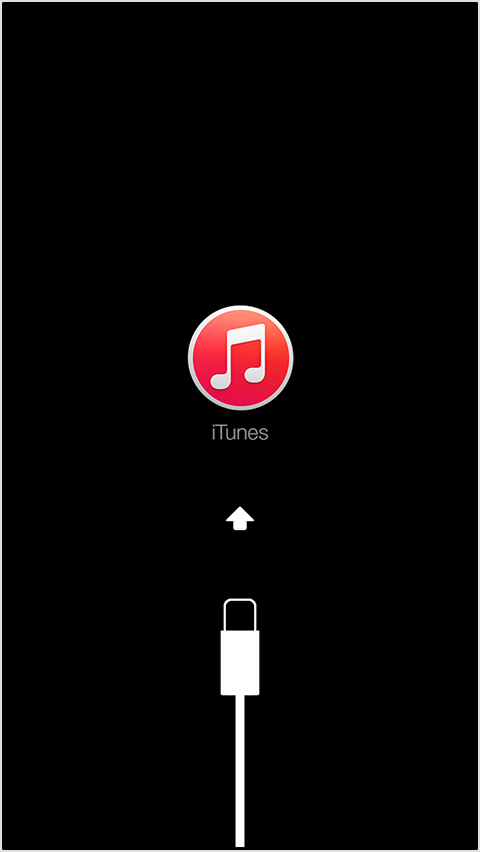
4) When you see this screen, release the Home button. If you don't see this screen, try steps 1 through 3 again.
5) When your device is connected, iTunes will open. You'll see a message saying that iTunes has detected an iPhone, iPad, or iPod touch in recovery mode.
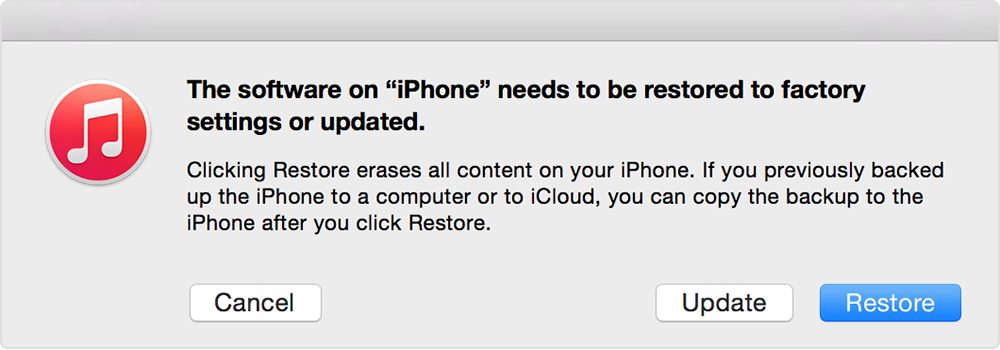
6) Use iTunes to restore your device. Restoring in recovery mode will erase your device. If you previously synced with iTunes or iCloud, you might be able to restore from your backup.
7) If none of the above steps are successful, throw the device in the appropriate trash receptacle.
1) Turn off your device and leave it off.
2) Plug in your device's USB cable to a computer with iTunes.
3) Hold down the Home button on your device as you connect the USB cable. Keep holding down the Home button until you see the Connect to iTunes screen.
4) When you see this screen, release the Home button. If you don't see this screen, try steps 1 through 3 again.
5) When your device is connected, iTunes will open. You'll see a message saying that iTunes has detected an iPhone, iPad, or iPod touch in recovery mode.
6) Use iTunes to restore your device. Restoring in recovery mode will erase your device. If you previously synced with iTunes or iCloud, you might be able to restore from your backup.
7) If none of the above steps are successful, throw the device in the appropriate trash receptacle.
Rangi Guy wrote:So skating back to the train station after work today things went wrong.....now my skateboard is at the bottom of the harbour

-
E.H. Ruddock
- Guys, I am not a moderator! I swear to God! Why does everyone think I'm a moderator?
- Posts: 52160
- Joined: Tue January 01, 2013 2:48 pm
Re: iTunes is a Dick!
Yeah it does the whole restore thing then gives me the error. Trash can it is!
Clouuuuds Rolll byyy...BANG BANG BANG BANG
-
Sgt. Crackpot
- F.U.B.A.R
- Posts: 9104
- Joined: Wed July 03, 2013 11:21 pm
- Twitter: RobertDowneyJr
- Location: Lft Craquepeau
- Contact:
Re: iTunes is a Dick!
This may or may not help too: http://support.apple.com/kb/TA38603E.H. Ruddock wrote:Yeah it does the whole restore thing then gives me the error. Trash can it is!
Rangi Guy wrote:So skating back to the train station after work today things went wrong.....now my skateboard is at the bottom of the harbour
-
E.H. Ruddock
- Guys, I am not a moderator! I swear to God! Why does everyone think I'm a moderator?
- Posts: 52160
- Joined: Tue January 01, 2013 2:48 pm